Showing posts with label Technology. Show all posts

Tuesday, July 23, 2024

Gaming Essentials Every PC Gamer Needs

Gamers are used to sitting in front of their PCs for hours. It makes us uncomfortable if you're not using a relaxing gaming chair that gives you an excellent seating experience while playing your favorite games or online games. A gaming chair is essential for every PC gamer, especially those designed to help support our spine and neck and encourage good posture.


Whether you're a novice or a seasoned veteran, having the right setup can significantly enhance your gaming sessions. Here’s a list of essentials every PC Gamer needs to take their gaming to the next level.

1. Powerful Gaming PC

At the heart of every great gaming setup is a powerful gaming PC. This doesn’t necessarily mean the most expensive one on the market, but it should have a good balance of a strong CPU, ample RAM (16GB is a good standard), and a capable GPU. Key components to consider include:

  • Processor (CPU): Look for at least an Intel i5 or AMD Ryzen 5 for mid-range gaming.
  • Graphics Card (GPU): A GTX 1660 Super or RTX 3060 for solid 1080p gaming.
  • Memory (RAM): 16GB is the sweet spot for most modern games.
  • Storage: An SSD for your operating system and games to ensure fast load times.

ViprTech Avalanche Gaming PC - AMD Ryzen 5
ViprTech Avalanche Gaming PC - AMD Ryzen 5 (12-LCore)

2. High-Resolution Monitor

A high-quality monitor is crucial for an immersive gaming experience. Key features to look for include:

  • Resolution: At least 1080p, but 1440p or 4K for higher-end setups.
  • Refresh Rate: 144Hz is ideal for smoother gameplay, especially in fast-paced games.
  • Response Time: 1ms to 5ms to reduce input lag.
 
ASUS TUF Gaming VG259QM 24.5” Monitor

      ASUS TUF Gaming VG259QM 24.5” Monitor


3. Mechanical Keyboard

A mechanical keyboard offers tactile feedback and durability that membrane keyboards can’t match. Look for features such as:

  • Switch Type: Cherry MX, Razer, or Romer-G switches, each offering a different feel.
  • Customization: Programmable keys and RGB lighting for a personalized touch.
  • Build Quality: A sturdy build with an ergonomic design.
Logitech G PRO Mechanical Gaming Keyboard, Ultra Portable Tenkeyless Design

4. Precise Gaming Mouse

A gaming mouse with adjustable DPI settings and ergonomic design can drastically improve your precision and comfort. Key considerations include:

  • Sensor: Optical sensors generally offer better accuracy.
  • DPI Range: A high DPI range (up to 16,000 DPI) for customizable sensitivity.
  • Buttons: Additional programmable buttons for in-game actions.
  • Ergonomics: A comfortable fit for long gaming sessions.

      ASUS ROG Spatha X Wireless Gaming Mouse


5. Comfortable Gaming Chair

Long gaming sessions require a chair that offers both comfort and support. Look for:

  • Ergonomics: Adjustable armrests, lumbar support, and recline features.
  • Material: Breathable fabric or high-quality leather for durability and comfort.
  • Build Quality: A sturdy frame to withstand hours of use.
AKRacing Masters Series Premium Gaming Chair with High Backrest, Recliner, Swivel, Tilt, Rocker and Seat Height Adjustment Mechanisms

AKRacing Masters Series Premium Gaming Chair with High Backrest, Recliner, Swivel, Tilt, Rocker, and Seat Height Adjustment Mechanisms


6. High-Quality Headset

Immersive sound is essential for both competitive and casual gaming. A good headset should have:

  • Sound Quality: Surround sound or virtual 7.1 for immersive audio.
  • Microphone: A clear, noise-canceling mic for in-game communication.
  • Comfort: Lightweight and comfortable for extended use.
  • Wireless Option: For added convenience and mobility.

Logitech G733 Lightspeed Wireless Gaming Headset with Suspension Headband, Lightsync RGB, Blue VO!CE mic technology and PRO-G audio drivers - Black


7. Reliable Internet Connection

A stable and fast internet connection is crucial for online gaming. Consider:

  • Speed: At least 25 Mbps for download and 5 Mbps for upload.
  • Latency: Low ping (below 50ms) for minimal lag.
  • Wired Connection: Ethernet cables offer more stability compared to Wi-Fi.


8. Effective Cooling System

Keeping your PC cool ensures optimal performance and longevity. Options include:

  • Air Cooling: High-quality fans to dissipate heat.
  • Liquid Cooling: More effective but also more expensive and requires maintenance.
  • Case Ventilation: Ensure your case has good airflow.


9. Gaming Desk

A sturdy and spacious desk designed for gaming can help organize your setup and improve comfort. Look for:

  • Space: Enough room for your monitor(s), keyboard, mouse, and other accessories.
  • Cable Management: Features to keep your cables tidy.
  • Durability: Strong materials that can support the weight of your equipment.


10. RGB Lighting

While not essential for performance, RGB lighting can add a visually appealing element to your gaming setup. Consider:

  • Customizability: Sync lights with your gameplay or create personalized patterns.
  • Placement: Strip lights, desk lights, or case lighting to enhance the ambiance.


Having the right gaming essentials can transform your PC gaming experience from good to extraordinary. Investing in quality components and accessories enhances gameplay and ensures comfort and efficiency during those marathon sessions. Tailor your setup to your preferences and game on!

Embrace the world of PC gaming with these essentials, and you'll be ready to tackle any virtual challenge that comes your way. Happy gaming!


"Live life to the fullest"

Wednesday, June 17, 2020

SALE: Xbox One X Cyberpunk 2077 Limited Edition for Only $299!


Cyberpunk 2077 is an open-world, action-adventure story set in Night City, a megalopolis obsessed with power, glamour and body modification. You play as V, a mercenary outlaw going after a one-of-a-kind implant that is the key to immortality. You can customize your character’s cyberware, skillset and playstyle, and explore a vast city where the choices you make shape the story and the world around you.


With the Xbox One X Cyberpunk 2077 Limited Edition Bundle, step into the shoes of an urban mercenary equipped with cybernetic enhancements in a massive, ever-evolving open world. Become a cyberpunk, an urban mercenary equipped with cybernetic enhancements and build your legend on the streets of Night City.


"Live life to the fullest"

Tuesday, June 16, 2020

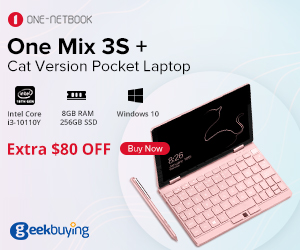
SALE: One Netbook One Mix 3S+ Yoga Pocket Laptop

Say NO to overweight and bring a portable trip for yourself.

GeekBuying.com

One Netbook One Mix 3S Highlights:

Fingerprint Recognition
It allows you to get access to your device quickly, convenient, secure and fast.
Backlit Keyboard
Backlit keyboard for easy and accurate typing at night.
CPU: Intel Core i3-10110Y,Dual Core,1.00GHz~4.0GHz
Intel processor gives One Mix 3S+ a powerful business office performance and delivers plenty of power for multitasking, gaming, and movies.
8GB RAM + 256GB PCI-E SSD ROM
8GB RAM offers a fast read and write speed which allows games and programs to run smoothly. 256GB ROM is sufficient for the average user's data storage.

8.4-inch Multi-Touch Screen With High 2560*1600 Resolution
High-resolution displays for tablets. It is perfect for everyday use, but also suitable for specialist workloads.

8600mAh Large Battery
Use this laptop all day and night on one charge.

Windows 10
Equipped with the latest genuine Windows 10 operating system with up to date software updates.
Dual Band 2.4GHz / 5.0GHz WiFi
802.11a/ac/b/g/n Wlan, allows you to connect to the Web while within range of an available wireless network.

Save more when you buy now because it's geekbuying's 8th Anniversary Sale!

GeekBuying.com


"Live life to the fullest"

Thursday, July 20, 2017

0% Installment Plan on ASUS Zenfone Max Series and Zenfone Live!

Here is another incredible news to all Zen Fans!


Whether you're a hardcore mobile gamer or a Livestream lover, you can experience the incredible with the Zenfone 3 Max series and the new Zenfone Live via the Flexi Finance installment plan. 

Start to Max Your Life and Livestream Beautifully! Get your Zenfone now at 0% interest! NO need for Credit Cards, just present any Valid IDs at any ASUS authorized partner stores nationwide listed in this doc:

https://drive.google.com/file/d/0B5_L_8-ZR7hSVHNPZkZpSXUwUnM/view

Promo period is until August 15, 2017, only.

Meanwhile, ASUS Zenfone Selfie is now at 32% OFF at Lazada! You can now get this awesome smartphone at  ₱ 6,799.00 only from its previous price of  ₱ 9,995.00!

 ASUS Zenfone Selfie SALE at Lazada

SHOP HERE =>> http://bit.ly/2sYi0x8

Shop now for more incredible deals only at Lazada... 

"Live life to the fullest"

Saturday, July 6, 2013

Checkout Viber Desktop for Windows and Mac

Our router is busted and I can't use Viber and other apps that needs WiFi connection for 2 or 3 days already. I was glad I have searched for Viber online and I've found out that there's Viber Desktop for Windows and Mac! This is great, I can now use Viber even when I am using my PC or Laptop. Hehehe...


Viber for Windows lets you send free text messages and make free voice and video calls from your PC or Mac to other Viber users, on any device and network, in any country!

Viber syncs your contacts, messages and call history with your mobile device, so you can start the conversation on the Viber mobile application and continue from the comfort of your PC.
  • Best-quality HD voice calls
  • Video calls
  • Free text and photo messages
  • Group conversations
  • No registration, passwords or invitations required
  • Contacts and messages sync between your mobile and Windows
  • Transfer ongoing calls between devices
Here's where you can Download Viber for Windows and Mac.

"Live life to the fullest"

Wednesday, May 27, 2009

XBOX Live Server Crash

Microsoft Xbox Live Service Is Down For The Moment

Microsoft may be doing well nowadays after the recent announcement of the Zune HD, but they are experiencing problems with the Xbox Live. In the press release concerning the new Zune HD, Microsoft said that the portable media player will have the option to connect to Xbox and Xbox Live, but why having this option if it’s not working? Well, people are overreacting now as Microsoft is aware of the Xbox Live problem and they are working hard to solve the issue.

Sunday, April 5, 2009

The Gateway® M-6843 Garnet Red

From 2nd Mindanao Bloggers Summit in GenSan

From 2nd Mindanao Bloggers Summit in GenSan


The Gateway® M-6843 Garnet Red Notebook Specifications


Feature Description
Processor Intel® Core™ 2 Duo Processor T5750
2.0 GHz | 2 MB L2 Cache | 667 MHz FSB
Chipset Intel® GM965
Display panel 15.4-inch Ultrabright™ WXGA TFT display (1280 × 800)
Memory 3072 MB 667 MHz DDR2 SDRAM (1 × 1024 and 1 × 2048)
Operates at 667 MHz
Total slots: 2 DDR2 slots | Available slots: 0 DDR2 slots
Video controller Intel® Graphics Media Accelerator X3100
Up to 384 MB of Dynamic Video Memory
Webcam 1.3 Megapixel
Fingerprint reader No
HDMI connector No
Audio High definition audio - 2 channel
Hard drive 160 GB 5400 RPM SATA hard drive
Optical drive 8X Multi-Format Dual Layer DVDRW with DVD-RAM
and Labelflash™

Write maximum: 8X DVD +/-R, 6X DVD-RW, 8X DVD+RW, 2X DVD-R DL, 2.4X DVD+R DL, 5X DVD-RAM, 24X CD-R and 16X CD-RW discs
Read maximum: 8X DVD-R/RW/ROM, 4X DVD+/-R DL, 5X DVD-RAM, 24X CD-R/RW/ROM discs

Modem Integrated V.92 56K modem
Network 10/100 Ethernet LAN
802.11a/b/g wireless LAN
Memory card reader 5-in-1

  • Memory Stick®
  • Memory Stick Pro®
  • Multimedia Card™
  • Secure Digital™
  • XD

MiniSD and RS-MMC (when used with adapter that is supplied with card)

Interfaces
  • Three - USB 2.0 ports
  • One - VGA port
  • RJ-11 modem port
  • RJ-45 LAN port
  • Headphone/SPDIF Audio Out jack
  • Microphone jack
  • One - Lock slot
  • Power input
Pointing device Touchpad with vertical scroll zone
Expansion slot Expresscard® Type 54
Battery 6-cell Lithium-ion
Dimensions 1.1 to 1.50-inches (H) × 14.00-inches (W) × 10-inches (D)
25 to 38.10 mm (H) × 355.60 mm (W) × 254.00 mm (D)
Weight 6.29 pounds
2.85 kilograms

"Live life to the fullest"

Sunday, March 30, 2008

Problem Solved

A while ago, my cutie li'l niece suddenly pressed some buttons on the keyboard of her dad's MacBook... We don't know how did she do it that the display on the screen is on Vertical position already... Kept on pressing different buttons but still can't fix it... Her dad left it on his flat and let me use it coz they were about to go. And so I tried to restart but to no avail it didn't work... I've tried searching on the control pannel but couldn't find the right solution.


I think you'd suffer from a stiff neck if you keep on reading and using the book and the screen's on vertical position, lol. So, I've asked some of my friends if they have any idea on how to fix it... A good friend of mine, Ghenessa, suggested something but still it didn't work out... I've tried searching on the internet but can't stay long reading it with my neck on the right side always...

This is how it looked like...


It was a good thing that one of my best friend Jane, was online and she did helped me out on my problem... and we did finally fix it (Actually siya ang naka-discover hehehe).


So, What did we do???


Press CTRL + ALT + UP ARROW... As simple as that... My niece is really makulit kasi, well atleast We've learned something from what happened and now I can see my monitor displays normally... =)

"Live life to the fullest"

Share

Related Posts Plugin for WordPress, Blogger...